
Export your ebook cover as a 1,600 × 2,560 px (width × height) JPG in RGB. That single file, sized to a 1.6:1 aspect ratio, meets or clears the minimum requirements at nearly every major retailer, so you upload once and stop second-guessing formats.
A few quick notes before you open your design software:
- File type: JPG, saved in RGB (sRGB works fine).
- Aspect ratio: 1.6:1 is the safe default; some designers use 1.5:1 for wider, illustration-heavy covers, though it's the exception, not the rule.
- Why this size: it's the KDP-recommended dimension, and building at this scale from the start avoids the blurry, pixelated look that comes from stretching a smaller file after the fact.
If you already know you're going wide (Apple Books, for instance, prefers a 2:3 ratio), keep reading. The workaround takes one extra export, not a redesign.
Key Takeaways
A cover exported at 1,600 × 2,560 px in RGB JPG format at quality 85 will pass upload checks at nearly every major ebook retailer without a redesign.
| Point | Details |
|---|---|
| Use the universal safe size | Export at 1,600 × 2,560 px (1.6:1 ratio) to satisfy KDP, Kobo, and Draft2Digital minimums at once. |
| Design large, then crop down | Build at the biggest size any target store needs, then scale down rather than stretching a small file up. |
| Save as JPG, RGB, quality 85 | This combination balances sharpness and file size while staying under most store size limits. |
| Watch platform-specific quirks | IngramSpark accepts JPG only and rejects full-wrap print PDFs submitted as ebook covers. |
| Publish through Thedigitalreads | Upload your finished EPUB, PDF, or DOCX with cover attached for instant reader download. |
Table of Contents
- What Are the Ideal Ebook Cover Dimensions for Each Platform?
- How Should You Design and Export a Cover That Won't Get Rejected?
- Why Do Ebook Covers Get Rejected, and How Do You Fix Them?
- What Evidence Backs the 1,600 × 2,560 Standard?
- What's the Difference Between Ebook and Print Cover Sizes?
- How Thedigitalreads Helps You Publish Once You've Got the File Right
- Sources
- FAQ
What Are the Ideal Ebook Cover Dimensions for Each Platform?
Every retailer publishes its own numbers, and they don't quite match. The good news: the differences are small enough that one master file, cropped a few different ways, covers you almost everywhere.
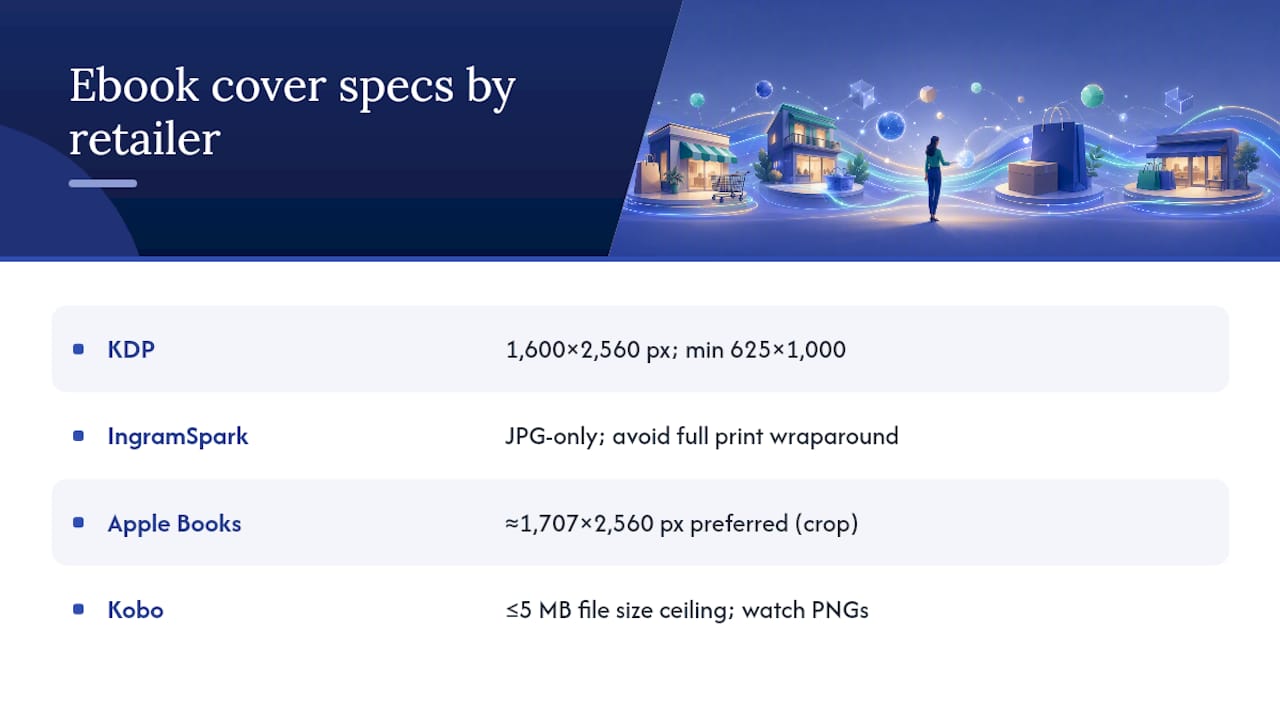
A few things worth flagging beyond the numbers. KDP's own guidance sets a hard floor: dimensions must stay above 625 × 1,000 px, and anything under 500 px on the short side risks looking soft or getting flagged during review. IngramSpark's JPG-only rule catches more authors than you'd expect, especially those who accidentally upload their full print wraparound instead of a front-only ebook file. Kobo's 5 MB ceiling is generous for a properly compressed JPG, but a heavily layered PNG can blow past it fast.
If you're publishing to KDP and Apple Books at once, don't design two separate covers. Build your file at 2,560 px tall, then export two widths: 1,600 px for KDP's 1.6:1 ratio and 1,707 px for something closer to Apple's preferred shape. Same artwork, same type treatment, two crops.
How Should You Design and Export a Cover That Won't Get Rejected?
Start big and shrink down, never the other way around. Design your canvas at 1,600 × 2,560 px minimum. If Apple Books is on your distribution list, work at 1,707 × 2,560 px instead, then crop down to 1,600 px wide for KDP. Building at the largest size any retailer asks for and scaling down afterward is what keeps text and detail sharp when the file gets shrunk for a store thumbnail.
Thumbnail legibility is where a lot of good covers quietly fail — learning how to design kids' book covers that engage young readers can help authors tackle this challenge effectively. Your title has to read clearly at postage-stamp size, since that's how most readers will first encounter it while scrolling a store page.
- Keep your title and author name large enough to read at 150 px wide.
- Use high contrast between text and background, not subtle gradients.
- Leave breathing room around edges, since some stores crop slightly on upload.
- Avoid cramming a tagline, series number, and review blurb onto the front, all at once.
When you're ready to export: save as a JPG at quality 80 to 90 (85 is a solid middle ground), keep the color profile in RGB or sRGB, and set your pixel dimensions exactly rather than trusting "close enough." Skip the temptation to obsess over DPI. E-readers display pixels, not print resolution, so pixel count matters more than DPI for how sharp your cover looks on a screen.
Pro Tip: If your cover has a light or white background, add a 3 to 4 pixel medium-gray border around the edges. Without it, your cover can visually vanish against a white store page, and that border is exactly what KDP recommends for light designs.
One more habit worth building: never upload a full-wrap print PDF as your ebook cover. Print files include spine and back-cover art that ebook platforms don't want and often can't process correctly.
Why Do Ebook Covers Get Rejected, and How Do You Fix Them?
Most rejection messages boil down to four repeat offenders. Here's how to diagnose and fix each one fast:
- Image too small. Check your file's actual pixel dimensions in Photoshop (Image > Image Size), Canva's download panel, or your computer's file properties. If it's under a platform's minimum, don't stretch it. Rebuild the cover at a larger canvas instead. Scaling up a low-resolution file only magnifies the blur.
- Wrong color profile. CMYK files built for print will look off or get bounced by ebook platforms. Resave in RGB, and export as JPG rather than a print-ready TIFF.
- File exceeds the store's size limit. Recompress at quality 85 rather than 100. That single change usually drops file size dramatically without a visible quality hit.
- Full-wrap print cover mistaken for an ebook file. Crop to the front panel only, matching the target ratio (1.6:1 for most retailers), and re-export at the correct pixel dimensions.
When in doubt, recreate rather than patch. A file built at the wrong size from the start rarely fixes itself with a quick resave.
What Evidence Backs the 1,600 × 2,560 Standard?
The case for this dimension isn't a guess. It's the size KDP itself recommends, and building at this scale from the outset meets or exceeds the stated minimums at Kobo, Draft2Digital, and most other major retailers without needing a separate export for each.
Amazon's own cover guidelines specify JPG or TIFF in RGB, note that files under roughly 500 pixels on the short side may not display cleanly, and recommend a narrow gray border for covers with light backgrounds so the edges stay visible against a white store page.
That border tip matters more than it sounds. A pale cover with no defined edge can effectively disappear on a bright product page, and it's an easy fix most authors skip.
Thedigitalreads supports EPUB, PDF, and DOCX uploads for the independent authors who publish through the platform, and covers get a basic legibility and dimension check as part of the intake process before a title goes live for instant download. It's a small step that catches the same sizing problems covered above before a reader ever sees them.
What's the Difference Between Ebook and Print Cover Sizes?
Print covers carry extra baggage that ebook files don't need: bleed margins, spine width calculated from page count, back-cover copy, and a barcode box. None of that belongs on an ebook file. Ebook covers are front-only, with no bleed or trim marks required, and they're built in RGB rather than the CMYK color space print shops expect.
This is exactly why full-wrap print PDFs get rejected so often when authors upload them as ebook covers. The dimensions don't match, the color profile is wrong, and the file usually contains three panels (front, spine, back) where the ebook platform wants exactly one.
Mobile screens complicate things further. Most readers now browse ebook covers on a phone, where your cover might display at a fraction of its full size, sometimes under 200 pixels wide in a search results grid. That's another reason the "design big, keep text bold" rule matters. A cover that looks sophisticated at full size can turn into an illegible smear on a five-inch screen if the title type is too delicate or the contrast is too subtle.
A Publisher's-Eye View of Cover Intake
When a cover file comes in properly sized, it moves through review in minutes. Thedigitalreads' team checks pixel dimensions and format first, previews how the title reads as a thumbnail, and only kicks a file back for cropping when the ratio is clearly off. If your cover gets flagged, the platform's support channel will tell you exactly which spec it missed rather than leaving you guessing.
How Thedigitalreads Helps You Publish Once You've Got the File Right
Once your cover is sized, cropped, and exported, the next question is where it actually goes. Thedigitalreads gives independent authors a direct route to readers browsing science fiction, fantasy, horror, thriller, and romance, without routing every sale through a traditional retail gatekeeper.
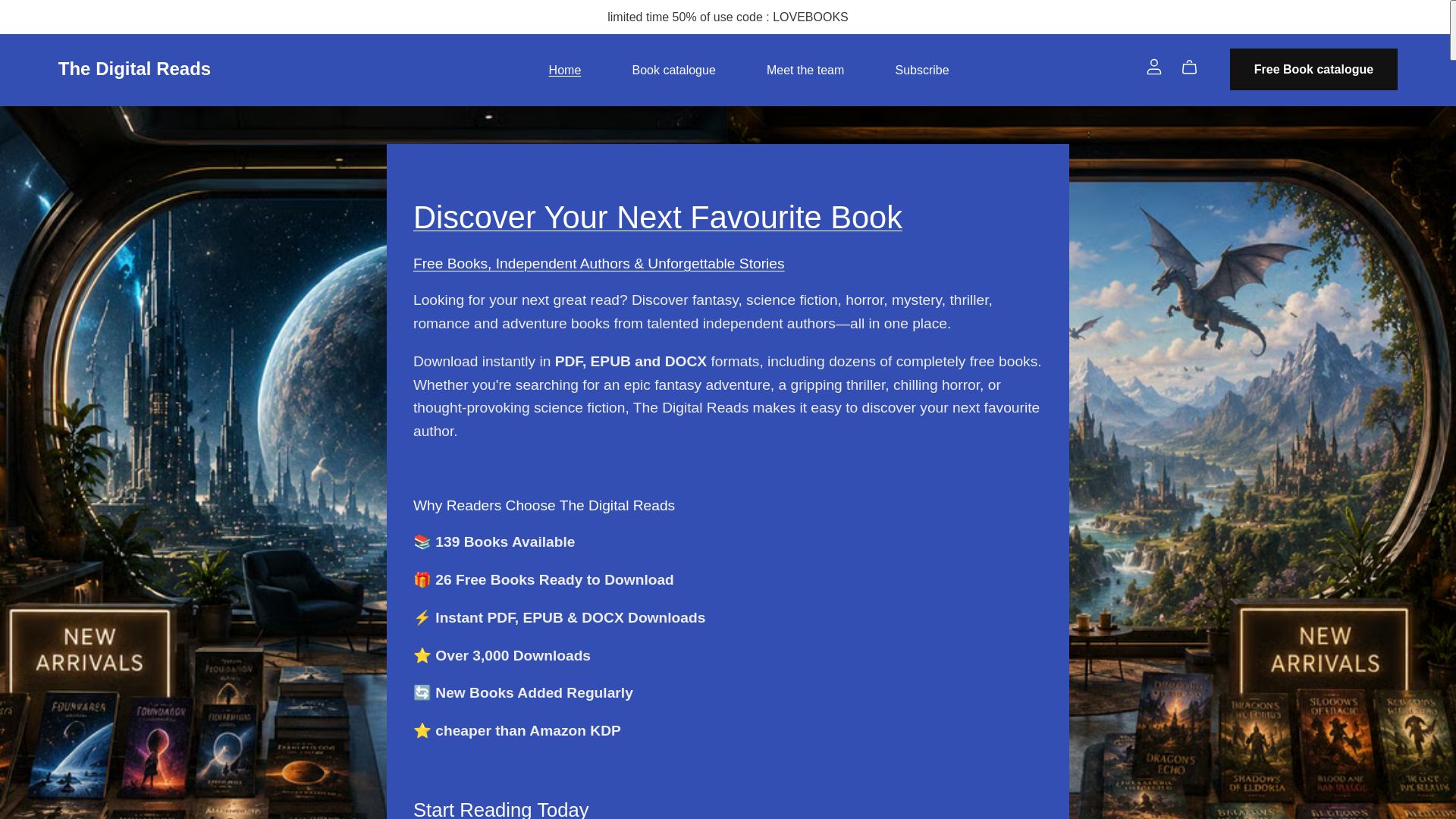
Authors upload their EPUB, PDF, or DOCX files (with a properly sized cover attached) directly through the platform, and titles go live for instant reader download shortly after. There's no waiting on a lengthy review queue built for print distribution, and no need to format a separate file for five different store fronts. If you've followed the sizing and export steps above, your cover is already in shape for upload. Head to the Thedigitalreads platform to start setting up your author listing and get your book in front of genre readers looking for their next read.
Sources
- Book cover size guide — DesignDusk
- What criteria does my eBook's cover image need to meet? — KDP Help
- Ebook cover dimensions and file specs for every platform — EbookPBook
FAQ
What size should an ebook cover be?
The safest export size is 1,600 × 2,560 px in JPG format at a 1.6:1 aspect ratio, which meets requirements across most major retailers.
What is the ideal image size for an ebook cover?
1,600 × 2,560 px is the ideal starting point since it matches KDP's recommended dimensions and gives you room to crop for other stores without losing quality.
What is the standard page size for an ebook?
Ebook covers don't have a fixed "page size" the way print books do; they're measured purely in pixel dimensions, since e-readers display pixels rather than physical page sizes.
What is the size of a Kindle book cover?
Amazon KDP recommends 2,560 × 1,600 px (height × width), with a minimum of 625 × 1,000 px, saved as JPG or TIFF in RGB.